01↗
Live scanner audio
Monitor your own scanner at home over Wi-Fi or on the go using a configured remote connection. Your scanner remains connected to the antenna and Windows PC at your receiving location.
LIVE AUDIO STREAMING
 Downloads ↗
Monitor and operate your Uniden SDS100 from your iOS device, at home or on the go.
Stream live audio, follow channel and talkgroup activity, and operate the radio through an authenticated, encrypted connection. Built for iPhone and iPad, with a Windows server at your receiving station.
Monitor your own scanner at home over Wi-Fi or on the go using a configured remote connection. Your scanner remains connected to the antenna and Windows PC at your receiving location.
View system, department, channel, frequency, and talkgroup information alongside received audio. Follow scanner activity through an interface based on the radio’s display.
Apply system, department, and channel holds; avoid traffic; and operate the scanner remotely. Scroll through supported menus and tap an item directly to select it.
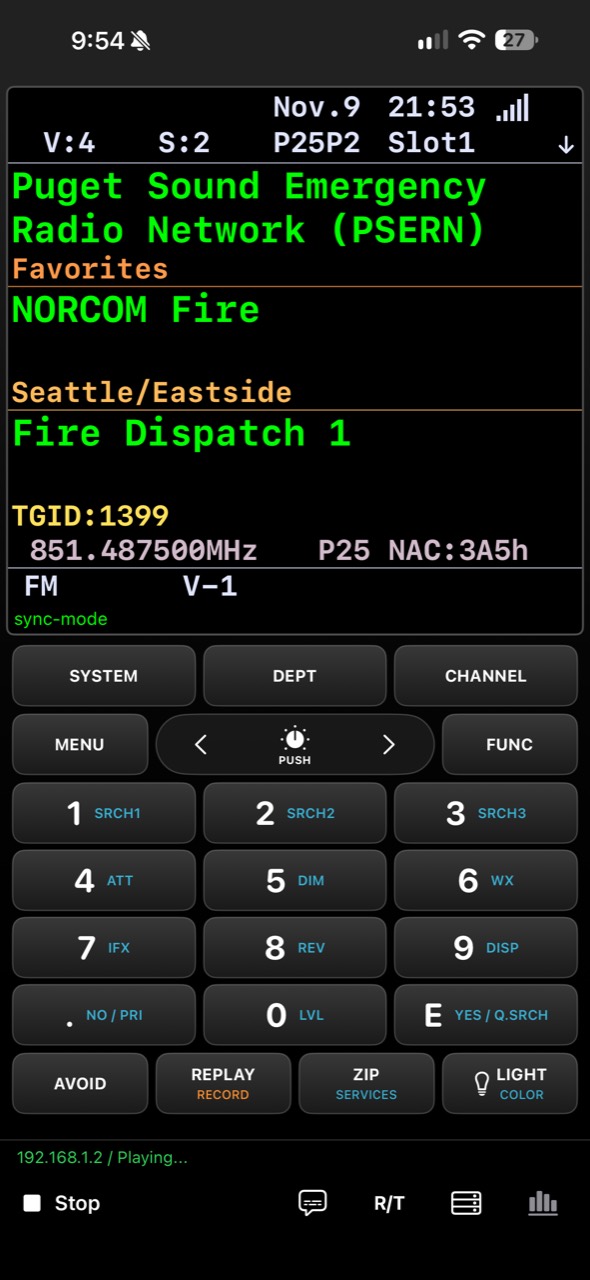
scanStreamer combines live reception information with a scanner-style keypad. Change what you monitor without returning to the radio or operating a remote desktop. Touch-menu selection and scrolling streamline access to settings and programming functions, reducing repeated use of the scanner’s physical keys and rotary control.
Monitor scanner audio with streaming latency as low as 1 second. Actual delay depends on network conditions, server configuration, and playback buffering.
Keep displayed scanner information synchronized with audio playback, or switch to real-time scanner status when operating controls.
Save paired servers, select a connection, and use automatic address selection where configured. Manual endpoint selection is also available.
Optional live captions transcribe received speech on supported hardware running iOS 26 or later. Caption text is processed on the device, without saving audio or sending it to a transcription service.
Recognition can be inaccurate with radio noise, names, and codes.Choose color, black-on-white, or white-on-black presentation. Compatible server profiles can supply scanner display colors.
Continue audio playback while using other apps, with system playback controls and channel information through Now Playing.
Scroll through scanner menus and tap supported items directly. Navigate settings and programming tasks with fewer repeated button presses than on the radio itself. Touch selection requires a compatible server and supported menu.
The scanStreamer Windows server connects to your scanner and provides the audio, display information, and command interface used by the iOS app.
Your SDS100 sends scanner data over USB. A separate audio connection carries the sound to your Windows PC.
Select the scanner’s data connection and audio input in the Windows server. The PC must remain powered on and connected for remote monitoring and control.
Scan the server’s invitation QR code, open a shared invitation file, or paste an invitation to pair your iOS device. Configure remote network access to connect while on the go.
Uniden SDS100, USB data connection, separate audio connection, a Windows PC running the scanStreamer server, and a compatible iOS device. On-the-go access requires appropriate server and network configuration.
The current development build is verified with the Uniden SDS100. Additional scanner models are under evaluation. An Android app is in development and is not yet available.
Install the iOS app on your iOS device and the Windows server at your receiving station. Both components are required.
Live scanner audio, reception information, and remote scanner controls.
App Store link coming soonConnect your scanner’s USB data and audio to the mobile app.
Windows installer link coming soonSignal9 Labs develops independent software products and custom applications. scanStreamer is our first featured product, bringing scanner integration, secure connectivity, and a dedicated mobile interface together.
Our work spans application design, connected systems, and product development.
Development preview · App Store and Windows server links will be available with the release.